

Affordable Social Media Schedulers Compared for SMBs
For most small and mid-sized businesses, Buffer is the single best starting point, with Later the clear pick for visual-first brands and SocialBee worth a serious look for teams that need content recycling and category-based queues. This affordable social media schedulers comparison covers all six tools the SERP consistently surfaces, evaluated on total cost, not just sticker price.
- Price-sensitive solo operators: Buffer’s free plan covers up to 3 channels; the paid Essentials tier charges $6/month per channel, making it the lowest raw cost in this group.
- Visual-first brands (Instagram, TikTok): Later’s grid preview and drag-and-drop calendar are purpose-built for this workflow.
- Multi-account managers: SocialBee’s category queues and Zoho Social’s CRM hooks give growing teams more structure than a basic queue.
TL;DR: Buffer wins on price and simplicity for most SMBs. If your content is visual or you manage multiple brand accounts, Later or SocialBee will serve you better.
Table of Contents
- Affordable social media schedulers comparison: at a glance
- How we define “affordable” and what we actually measured
- What each tool gives SMBs at affordable tiers
- How to choose the right affordable scheduler for your SMB
- Key Takeaways
- When a low-cost scheduler isn’t enough
- Marvingrowthpartners: strategy and execution beyond the scheduler
- Sources and further reading
Affordable social media schedulers comparison: at a glance
The table below reflects entry-level and mid-tier affordable pricing, not enterprise feature sets.
| Tool | Best for | Price range (paid) | Free plan | Platforms | Visual planning | Bulk scheduling | Team approvals | Analytics | AI features | Integrations | Ease of use |
|---|---|---|---|---|---|---|---|---|---|---|---|
| Buffer | Simplicity, price | $6/mo per channel | Yes (3 channels) | FB, IG, LI, X, TikTok, Pinterest, YouTube | Calendar view | Yes | Team plan only | Basic–Good | AI assistant | Zapier, Google Analytics | Very easy |
| Later | Visual/Instagram brands | $30–$80/mo | Yes (1 per platform) | IG, FB, TikTok, LI, Pinterest, X | Grid preview ✓✓ | Limited | Growth plan+ | Good (visual focus) | Caption AI | Shopify, Zapier | Easy |
| SocialBee | Content recycling, queues | high twenties | No (14-day trial) | FB, IG, LI, X, TikTok, Pinterest, YouTube | Calendar | Yes | Yes | Good | AI writer | Zapier, Canva | Moderate |
| Zoho Social | CRM-connected teams | Monthly pricing applies per workspace.+ | Yes (limited) | FB, IG, LI, X, YouTube, Pinterest | Calendar | Limited | Yes | Good | Limited | Zoho CRM, Zapier | Easy–Moderate |
| Loomly | Approval workflows | slightly over thirty dollars | No (15-day trial) | FB, IG, LI, X, TikTok, Pinterest, YouTube | Calendar | Yes | Yes ✓✓ | Good | Post ideas AI | Zapier, Slack | Moderate |
| Hootsuite | Teams, social listening | $99/mo+ | No | FB, IG, LI, X, TikTok, YouTube, Pinterest | Calendar | Yes | Yes | Deep | OwlyWriter AI | 100+ apps | Steep |
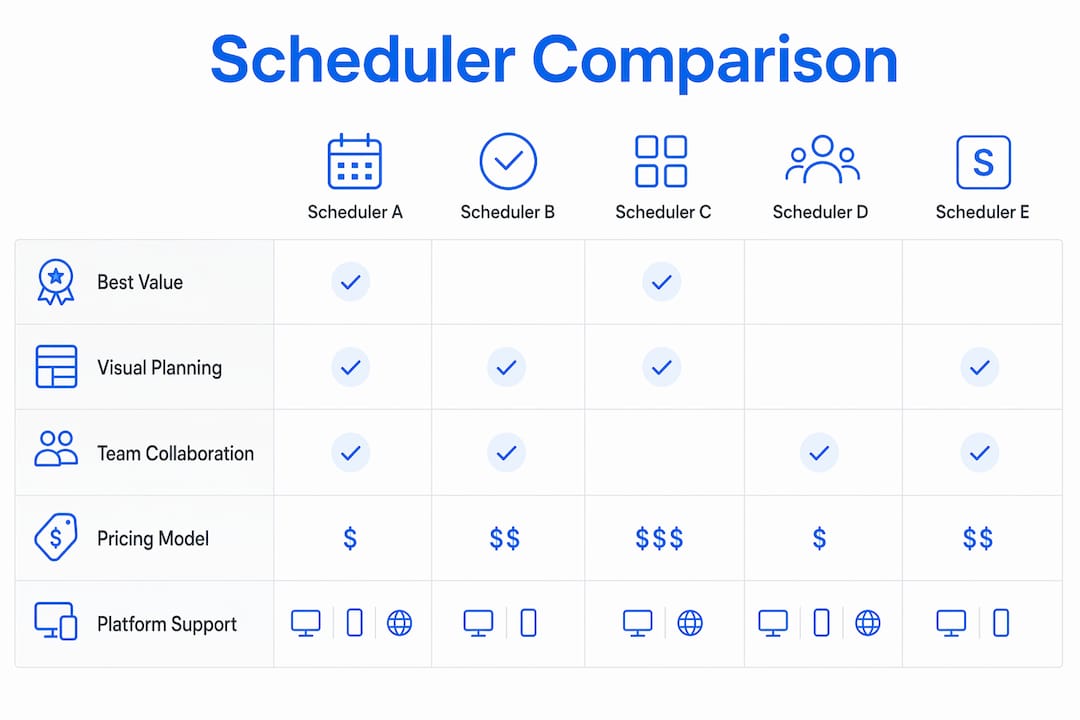
Two trade-offs stand out. First, per-channel pricing scales fast: Buffer at $6/channel looks cheap at three channels but matches Later’s Starter price at four, since Starter plans for Later start in the mid-twenties per month. Second, Hootsuite’s $99/month Professional plan covers only 3 accounts, making it the most expensive option here by a wide margin for any SMB posting to more than three platforms.
How we define “affordable” and what we actually measured
“Affordable” in this context means total cost, not just the monthly subscription line. That includes the per-channel or per-user charges that inflate the bill as you grow, plus the time-cost of labor when a tool lacks bulk scheduling or forces manual workarounds. A Monthly plans available at around ten dollars. A tool that costs your team three extra hours per week is not cheap.
One clarification worth making upfront: social media schedulers and appointment scheduling software are completely different categories. Tools like Zoho Bookings handle meeting bookings; Zoho Social handles post scheduling. Mixing them up is a common mistake that wastes evaluation time.
Pricing bands used here:
- Entry: Monthly pricing is around thirty dollars for a single user managing up to 6 channels
- Mid: $30–$80/month with team features and stronger analytics
- High: $80+/month, typically justified only by social listening or large team needs
Evaluation dimensions: pricing shape (flat vs. per-channel), channel limits, bulk scheduling, visual planning, team workflows, analytics depth, AI quality, integrations, and migration path. Pricing data reflects published rates as of 2026.
What each tool gives SMBs at affordable tiers
Buffer
Buffer is the fastest composer in this group. Write, attach, queue, done. The free plan covers 3 channels with basic scheduling; the Essentials plan adds analytics and an AI assistant at $6/month per channel. A business posting to Instagram, Facebook, and LinkedIn pays $18/month on Essentials, less than every other paid option here at equivalent volume.
Pros: Lowest entry cost, minimal learning curve, clean AI assistant, solid Zapier integration. Cons: Team collaboration requires the Team plan ($12/channel), no social listening, analytics stay basic on Essentials. Upgrade trigger: When you need approval workflows or deeper cross-platform reporting.
Later
Later’s grid preview is genuinely different from a standard calendar. You can drag and drop visual content into an Instagram grid before publishing, which matters for brands where aesthetic consistency drives engagement. The visual workflow advantage is real for Instagram and TikTok-first teams. The Starter plan, which starts at $30/month, covers one profile per platform; managing two locations requires the Growth plan at $45/month.
Pros: Best-in-class visual planning, strong Instagram and TikTok integrations, media library included. Cons: Account limits hit fast on Starter, LinkedIn and X analytics are weaker than Instagram, bulk scheduling is limited at lower tiers. Upgrade trigger: When you manage more than one account per platform or need advanced analytics.
SocialBee
SocialBee’s category-based queuing is the feature that separates it from Buffer and Later. You assign posts to content categories (promotional, educational, curated), and the tool rotates them automatically. That structure suits SMBs with a defined content mix who want to avoid manually rebuilding a queue every week. Pricing starts at $29/month with a 14-day trial.

Pros: Content recycling, category queues, bulk scheduling, team approvals, solid AI writer. Cons: No free plan, moderate learning curve, integrations thinner than Hootsuite. Upgrade trigger: When you need white-label reporting or a dedicated customer success contact.
Zoho Social
At $10/month, Zoho Social is the most affordable paid option with a genuine CRM connection. If your business already runs on Zoho CRM, the integration between social engagement and contact records is a real workflow advantage. The free plan exists but is limited; the paid tiers are where the tool earns its keep.
Pros: CRM integration, competitive price, decent analytics, multi-channel publishing. Cons: AI features are thin compared to Buffer or SocialBee, bulk scheduling is limited, interface feels denser than Buffer. Upgrade trigger: When social-to-CRM lead tracking becomes a core workflow need.
Loomly
Loomly’s strongest suit is its approval workflow. For SMBs where a founder, brand manager, or external stakeholder needs to sign off on every post before it goes live, Loomly’s structured review process is cleaner than what Buffer or Later offer at comparable price points. Starting at $32/month with a 15-day trial.
Pros: Clean approval workflows, post idea suggestions, calendar view, supports most major platforms. Cons: No free plan, AI features are limited to post ideas rather than full caption generation, price climbs with team size. Upgrade trigger: When your approval chain involves more than two people or external clients.
Hootsuite
Hootsuite is the most powerful tool here and the most expensive. The Professional plan runs $99/month for 1 user and 3 accounts. For an SMB posting to 5–6 channels, you’ll need to add account packs or upgrade to the Team plan at $249/month. The unified inbox and OwlyWriter AI justify the cost only when social customer service or competitive listening is a genuine business need, not a nice-to-have.
Pros: Deepest analytics, unified inbox, 100+ integrations, OwlyWriter AI, competitive benchmarking. Cons: Expensive, steep learning curve, overkill for simple publishing workflows. Upgrade trigger: You’re already there. Hootsuite is the upgrade destination for most SMBs.
How to choose the right affordable scheduler for your SMB
Start with your primary operational goal. If you need simple, reliable publishing across a handful of channels, Buffer is the answer. If your brand lives on visual content, Later. If you need structured content rotation or team approvals, SocialBee or Loomly. If social engagement connects directly to your CRM, Zoho Social. Hootsuite makes financial sense only when social listening or a high-volume customer inbox is part of the job.
Analysts consistently recommend mapping tool selection to your operational goal and avoiding feature overbuying at launch. The tool you’ll actually use every week beats the tool with the longest feature list.
Questions to ask during your trial:
- Does the tool support CSV bulk import for scheduling a full month of posts at once?
- What happens to your data if you cancel? Can you export your content calendar and post history?
- How many channels does the plan include, and what does each additional channel cost?
- Does the AI caption tool let you set a brand voice or tone, or does it generate generic output?
- What is the support SLA? Is live chat available on the plan you’re evaluating?
Red flags that should disqualify an otherwise affordable tool:
- Per-channel pricing with no cap (costs become unpredictable fast)
- No CSV export or content history download on cancellation
- No bulk import option at the entry tier
- AI features with no brand voice customization (generic content erodes brand consistency)
- Post or account limits buried in fine print that only appear after signup
When it comes to AI and brand voice, the right question is not whether a tool has AI, but whether you can configure it. Generic AI output that sounds like every other brand in your category is worse than no AI at all. For deeper guidance on preserving brand voice when using AI tools, the AI brand voice framework from 42voice is a useful reference.
Migration timeline:
- Days 1–30: Connect your 2 highest-priority channels, schedule one full week of posts, and test the CSV export before you commit.
- Days 31–60: Build out your content calendar for the next 60 days, configure any approval workflows, and document your AI prompt templates.
- Days 61–90: Audit analytics against your baseline, confirm integrations are firing correctly, and decide whether the tool’s limits are constraining growth.
Pro Tip: Before you migrate off a tool, export your full post history and save it outside the platform. Most affordable schedulers do not retain deleted or archived content, and that historical data is useful for content audits and repurposing.
Key Takeaways
Buffer is the best starting point for most SMBs on a budget, but total cost, including per-channel fees and labor hours, determines which scheduler actually saves money at your scale.
| Point | Details |
|---|---|
| Total cost beats sticker price | Per-channel fees and time-cost of manual workarounds often exceed the monthly subscription. |
| Match tool to operational goal | Buffer for simplicity, Later for visual brands, SocialBee for queues, Loomly for approvals, Zoho Social for CRM teams. |
| Free plans have real limits | Buffer’s free tier covers 3 channels; Later’s covers 1 profile per platform. Both are useful for testing, not scaling. |
| Plan your migration path | Affordable tools rarely include social listening or advanced CRM integrations you’ll need as you grow. |
| Marvingrowthpartners as next step | When tool selection isn’t the bottleneck and strategy execution is, Marvingrowthpartners offers fractional CMO and content strategy support. |
When a low-cost scheduler isn’t enough
The tools in this comparison are genuinely useful for SMBs that have a clear content strategy and the internal capacity to execute it consistently. Where they fall short is not in features but in strategic direction.
If your team is spending more time deciding what to post than actually posting, a scheduler won’t fix that. The same is true for businesses managing multiple locations, running lead generation through social, or trying to connect social activity to revenue outcomes. Those are strategy and execution problems, not tool problems.
DIY scheduling makes sense for very small teams with a defined content mix, tight budgets, and simple publishing needs across two or three channels. The moment you’re managing multiple brand accounts, running paid and organic together, or trying to attribute social to pipeline, the labor cost of DIY typically exceeds what a managed partner would charge. That’s the inflection point worth watching for.
Marvingrowthpartners: strategy and execution beyond the scheduler
Most SMBs don’t have a tool problem. They have a capacity problem. The right scheduler saves a few hours per week; the right strategy determines whether those hours produce revenue.
Marvingrowthpartners works with small and mid-sized businesses that have outgrown DIY marketing but aren’t ready for a full in-house team. The engagement covers what a scheduler can’t: content calendar design tied to business goals, tool selection and onboarding, AI prompt governance to protect brand voice, and reporting templates that connect social activity to actual pipeline. No recycled playbooks, no generic frameworks.
Relevant scope for social-focused SMBs:
- Content calendar design aligned to growth stage and revenue goals
- Social media tool selection, setup, and team onboarding
- AI prompt governance and brand voice preservation
- Analytics and reporting tied to business outcomes, not vanity metrics
If you’re at the point where the scheduler is running but the strategy isn’t, a growth strategy engagement with Marvingrowthpartners is the practical next step. Start with a discovery conversation to see whether the fit is there.
Sources and further reading
- Buffer vs. Hootsuite vs. Later vs. SocialPilot for Small Businesses (StackBuilt) — Detailed pricing breakdowns and feature comparisons for 2026; useful for verifying per-channel cost math.
- Buffer vs. Hootsuite vs. Later 2026 (StackBuilt) — Goal-based selection guidance and analyst commentary on feature overbuying.
- Social Media Scheduling Tools Compared (Conbersa) — Feature-gap analysis for affordable tiers; strong on migration path and per-channel pricing traps.
- Best Social Media Management Tools (Zapier) — Practitioner-level time-cost analysis; useful for calculating true labor cost of low-cost tools.
- Buffer vs. Later vs. Timed Post (Timed Post) — Visual workflow comparison; best source for Later’s grid preview advantage.
- AI and Social Tools Commentary (Metricool) — Practitioner notes on AI feature quality and brand voice preservation.
- Free Marketing Tools for Local Businesses (Marvingrowthpartners) — Guidance on testing free tiers before committing to paid plans.
- Build a Custom Marketing Strategy for Your SMB (Marvingrowthpartners) — Useful next read for SMBs ready to move from tool selection to strategy execution.
Recommended
- The Role of Social Media in Brand Presence for SMBs – Marvin Growth Partners
- Low-Cost Local Marketing Tactics for SMBs in 2026 – Marvin Growth Partners
- Build a Custom Marketing Strategy for Your SMB in 2026 – Marvin Growth Partners
- Best Social Media Platforms for Local Entrepreneurs – Marvin Growth Partners